
Author
AI video production course. Veo, Kling, Midjourney. 500+ assets included.
What is it? AI Video Labs v2 is Harry Beechinour’s workshop teaching how to create professional-quality videos using AI tools like Veo 3.1, Sora 2, Kling, and Midjourney. It covers the complete production workflow from ideation to final export, plus client work strategies. Designed for filmmakers, editors, and marketers who want to produce AI videos that don’t look AI-generated.
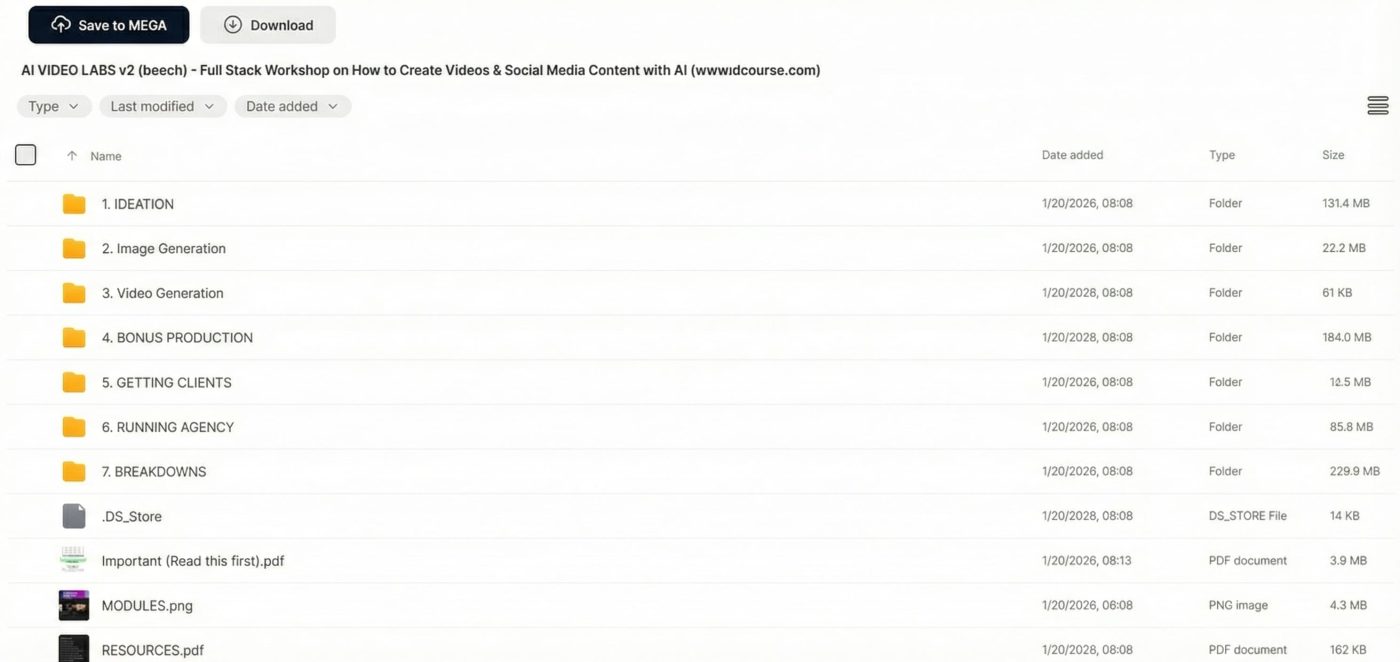
Verified Deliverables:
Everyone has access to the same AI video tools. Veo, Midjourney, Kling—they’re all available to anyone willing to pay the subscription. The result? A flood of content that looks obviously AI-generated. Clients aren’t looking for another AI video. They want work that uses AI capabilities but doesn’t trigger the “that looks fake” response. The gap between generic AI slop and professional AI-assisted production comes down to creative judgment, workflow efficiency, and finishing techniques. This course focuses on developing that judgment alongside the technical skills.
The training covers the complete production pipeline used for actual client projects. It starts with content ideation—frameworks for identifying viral concepts before they peak and turning vague briefs into visual stories. From there, you move into pre-production with scripting structures and Figma storyboard systems. The generation phase covers Midjourney for consistent character creation, plus animation using Veo 3.1, Sora 2, and Kling with proper transitions. Post-production includes professional editing techniques, cinematic color grading using included LUTs, and sound design with the asset library. For creators focused specifically on YouTube content, YTA Expert 2026 provides complementary channel growth strategies.
The course breaks down into practical modules you can apply immediately. Scripting frameworks help you structure narratives that hold attention. Storyboarding in Figma gives you visual planning before generation. Character consistency techniques solve the common problem of AI characters looking different across frames. Animation modules cover when to use Veo versus Kling versus other tools depending on the shot type. Editing sections teach pacing, transitions, and how to fix common AI artifacts. Color grading uses professional LUT packs included in the asset library. Sound design covers layering effects and music for emotional impact. For brand storytelling specifically, Story Hero Academy offers deeper training on narrative frameworks.
| Aspect | Generic AI Video | This Training |
|---|---|---|
| Character consistency | Different faces each frame | Consistent characters throughout |
| Motion quality | Obvious AI movement artifacts | Natural transitions and fixes |
| Color grading | Raw AI output colors | Professional LUT-graded looks |
| Sound design | Background music only | Layered effects and cinematic audio |
Harry Beechinour (also known as Beech) runs AI Video Labs and has created AI video content for brands. His approach focuses on practical production skills rather than hype—teaching techniques that produce work clients actually pay for. The training is updated as new tools emerge, covering current platforms like Veo 3.1 and Sora 2 rather than outdated methods.
Explore more AI & Automation courses for related content creation tools.
The workshop covers current AI video tools including Veo 3.1, Sora 2, Kling, and Midjourney for image generation. You’ll learn which tool works best for specific shot types and how to combine outputs in editing. The asset library includes prompts tested across these platforms.
Why get it here: Original price $299 — instant download at a fraction of the cost. If the link breaks, we replace it within 24 hours. 30-day money-back guarantee if files are corrupt.
What is AI Video Labs v2?
AI Video Labs v2 is Harry Beechinour’s complete AI video production workshop covering scripting, storyboarding, generation with Veo/Kling/Midjourney, editing, color grading, and sound design for professional-quality output.
Is this the complete course?
Yes. Includes all workshop modules, 500+ asset library, prompt collections, and business templates.
How do I access it after purchase?
Instant download link provided immediately after payment.
Who created this course?
Harry Beechinour (Beech), creator of AI Video Labs who produces AI video content for brands.
What AI tools do I need?
Access to Veo, Midjourney, or similar AI video/image tools. Specific tool recommendations included in training.
What if the download link doesn’t work?
Contact us and we’ll replace it within 24 hours.
Is there a refund policy?
Yes. 30-day money-back guarantee if files are corrupt or incomplete.

AI & Automation
AI & Automation

AI & Automation

AI & Automation